If you sell on Etsy and print through Spoonflower, every sale leaves two separate paper trails. Etsy tells you what the buyer paid. Spoonflower tells you what the print cost. Neither one mentions the other, so the number you actually care about, what you kept, never appears anywhere. Lumitela reads both sides, pairs them up for you, and shows the margin on every order.
Why an Etsy sale and a Spoonflower receipt never line up
An Etsy order arrives as a "You made a sale" email. A day or so later you place the fulfillment order on Spoonflower, and a "Receipt for Order" email comes back with a completely different order number. There is no shared reference between the two, so a spreadsheet means looking up the buyer, finding the receipt, and typing both amounts into a row. Do that for a busy month and you stop doing it.
With the pairing made, Lumitela can show gross margin (the Etsy sale minus the Spoonflower cost) and net margin (the same, after Etsy's own fees), right down to the individual order.
How Lumitela matches Etsy orders to Spoonflower receipts
There is no order number to join on, so Lumitela matches on evidence:
- Ship-to fingerprint. Same ZIP code, same street number, and at least one shared name token. For orders shipped outside the US, where postcodes and street lines take many shapes, Lumitela recognizes the country's address format and compares the address as a whole.
- Time. The receipt must be placed at, or shortly before, the Etsy order, and no more than 45 days after it.
- Amount. The receipt cannot be implausibly more expensive than the sale.
Among the candidates that pass, the best-scoring pair wins. The matcher is deliberately strict: when it is not sure, it leaves the order Unmatched for you rather than guessing, so a wrong pairing never quietly distorts your margins.
Every Etsy order on the Etsy Fulfillments list carries one status: Unmatched, Matched, Needs review, Canceled, Refunded, or Add-on. A Status filter lets you triage, and the notification bell links straight to whatever is still waiting for a receipt.
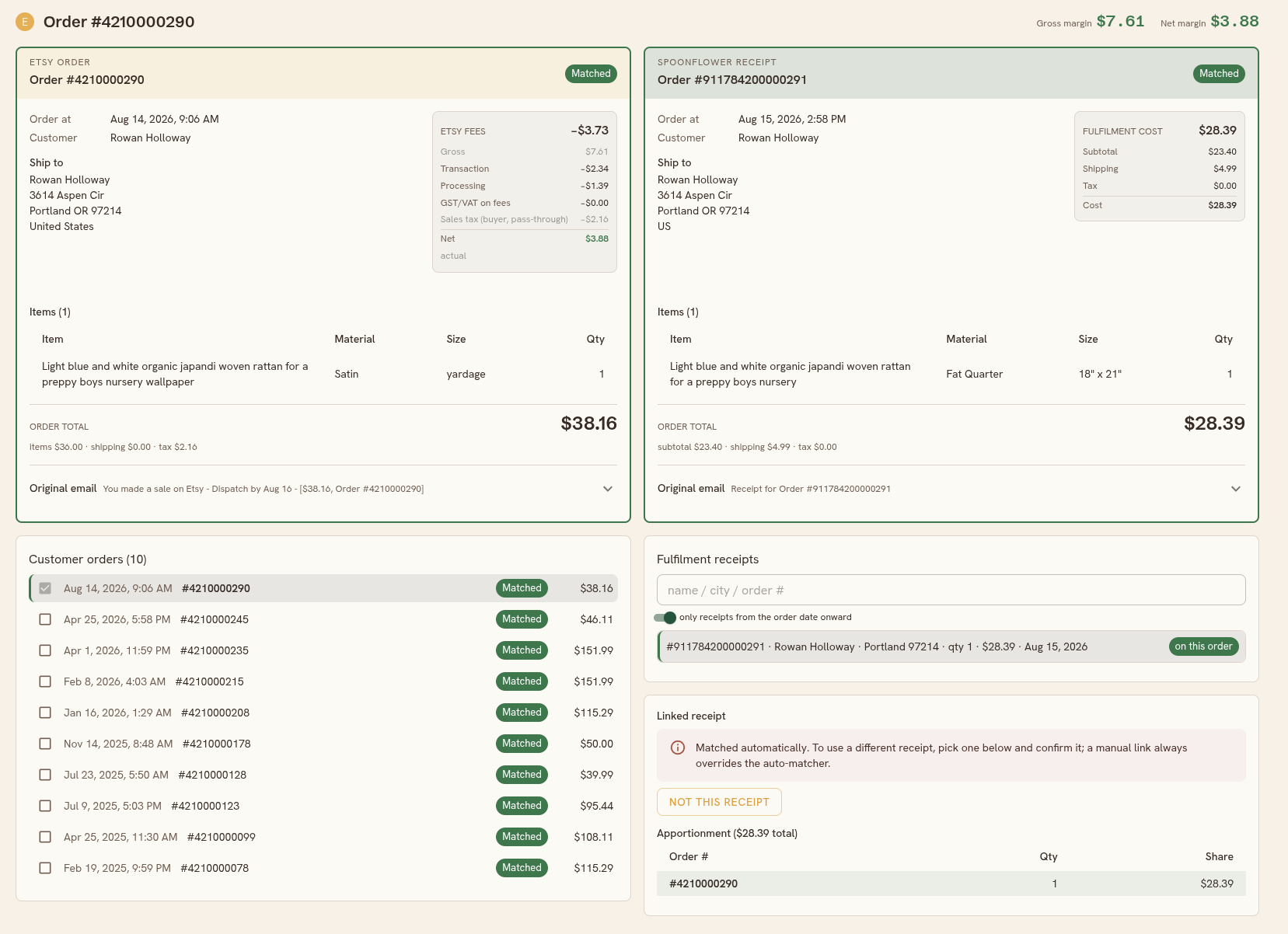
The match workspace, for the orders that need a look
Most orders match on their own. For the rest, click any order to open its workspace: the Etsy order and the selected Spoonflower receipt side by side, each with its items, amounts and original email, and the order's gross and net margin in the top corner. Below them, Customer orders lists every order from that buyer and Fulfillment receipts lists suggested and searchable receipts. From there you can:
- Confirm a different receipt. A manual link always overrides the auto-matcher, and the panel warns you first if that receipt currently fulfills another order.
- Say "not this receipt". The order returns to Unmatched and Lumitela will never re-propose that exact pairing unless you allow it again.
- Spread one receipt across several orders. Batched a print run for one buyer? Tick each covered order and the cost is apportioned by quantity, with the split previewed first.
- Add a second receipt, or mark a re-send so a replacement shipment counts against your margin without pretending to be new revenue.
- Clip an add-on. A rush fee paid through a separate custom listing arrives as its own Etsy order with nothing to fulfill. Clip it to the main order and its revenue and fees count there, without inflating your unit count.
Receipts for things you ordered yourself can be marked as Self order and are excluded from matching and from your costs. The full walkthrough is in Etsy to Spoonflower order matching.
The Etsy fee breakdown, order by order
Etsy charges several separate fees on every sale. Lumitela models each one against the sale's revenue, following the country your Etsy shop is registered in:
- Transaction fee, 6.5% of revenue in every market.
- Processing fee, a percentage of the buyer's total plus a small flat fee per order, in your shop's own currency.
- Offsite Ads fee, only on orders that came through Etsy's offsite advertising program.
- Regulatory operating fee, an extra percentage charged only in a handful of countries.
- GST or VAT on Etsy's fees, only for sellers who are not GST or VAT registered.
Lumitela carries fee schedules for the US, Australia, the UK, Germany, France, the Netherlands, Spain and Italy. Whenever your imported Etsy statement covers an order, its actual figures replace the estimate, and the breakdown says which is which. Gross and net for Etsy sales are defined in Fees, net sales and the Spoonflower bonus schedule; cancellations and refunds are covered in Spoonflower and Etsy orders and cancellations.
How your orders get into Lumitela
Live orders come from a one-time forwarding rule in your own mailbox: one filter for Spoonflower sales, one for Etsy sales, and one for the Spoonflower receipts that fulfill them. New orders show up within a minute or two, with no passwords handed over. Setup is in Forward your Spoonflower and Etsy order emails in real time.
Your history comes in through the Lumitela Chrome extension, which pulls your Spoonflower statements year by year and your Etsy statements month by month, plus an export of your old order emails. The statements bring the real fee totals; the emails bring what was actually on each order.
Questions about the Etsy integration
Does Lumitela connect to my Etsy account directly?
No. Lumitela reads the order emails you forward and the statements you import with the extension. There is no Etsy login to hand over and nothing is ever written back to your shop.
What happens when the auto-matcher is not sure?
The order stays Unmatched, or is flagged Needs review if two receipts look equally likely. You pick the right receipt in the workspace, and that manual link always wins.
Are the Etsy fees real or estimated?
Both, and Lumitela tells you which. Orders covered by an imported Etsy statement use the statement's actual fees. Newer orders are estimated from Etsy's published schedule for your shop's country until the next statement lands.