Spoonflower pays a monthly volume bonus on top of your regular royalty once your earnings for the month cross certain thresholds. The catch is timing: the bonus posts on your statement after the month closes, so during the month you are guessing. Lumitela's Spoonflower bonus tier tracker shows where you stand today, how far you are from the next tier, and what the bonus is likely to be, and it updates as each new order comes in.
How Spoonflower's bonus tiers work
The schedule Lumitela uses has four tiers. "Earnings" here means your net Spoonflower royalty for the month, which is gross minus Spoonflower's withholding, and the bonus itself is a percentage of your retail sales for that month.
| Monthly net earnings | Bonus tier |
|---|---|
| Under $300 | No bonus |
| $300 to $999.99 | 1% of retail |
| $1,000 to $1,499.99 | 3% of retail |
| $1,500 and up | 5% of retail |
Two things follow from that. First, a cancellation in the current month lowers your net earnings, so it can move you back across a threshold as well as forward. Second, the last few days of a month matter: a handful of sales can be the difference between 1% and 3% on everything you sold that month. The full rules behind these figures are in Fees, net sales and the Spoonflower bonus schedule.
What the Spoonflower bonus tier tracker shows
The tracker is a card on the dashboard, next to the summary tiles. It shows:
- Your current tier as a chip: no bonus, 1%, 3% or 5%.
- This month's Spoonflower earnings so far, with a progress bar toward the next tier.
- How much more you need to reach the next tier, and the bonus amount itself.
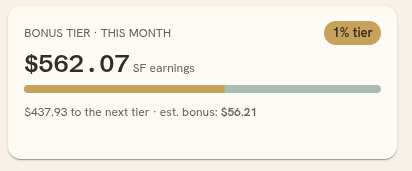
For a month Spoonflower has already posted a statement for, the card shows the actual bonus credit from that statement. The current, still-open month has no statement line yet, so Lumitela estimates the bonus from what you have earned so far and labels it "est. bonus" until the real figure posts. When the next statement lands, the estimate is replaced by the actual figure, and the earlier months stay exactly as Spoonflower reported them. To see where that credit sits on the statement itself, read how to read your Spoonflower earnings statement.
Updated as each Spoonflower order lands
The tracker is only useful if it is current, so it runs off the same two feeds as the rest of Lumitela. Your Spoonflower payment statements come in through the Chrome extension, which pulls them year by year and keeps them synced on a schedule. New orders arrive through a one-time email forwarding rule in your own mailbox, so an order confirmation reaches Lumitela within a minute or two of reaching you.
That combination is what lets the card move during the month. A new order that so far exists only as an email counts toward this month's earnings straight away, with the withholding estimated at the rate on your most recent withheld statement line rather than assumed. If your statements have never shown withholding, gross and net are the same figure. See Forward your Spoonflower and Etsy order emails in real time and Import your Spoonflower sales history.
The bonus on the rest of the dashboard
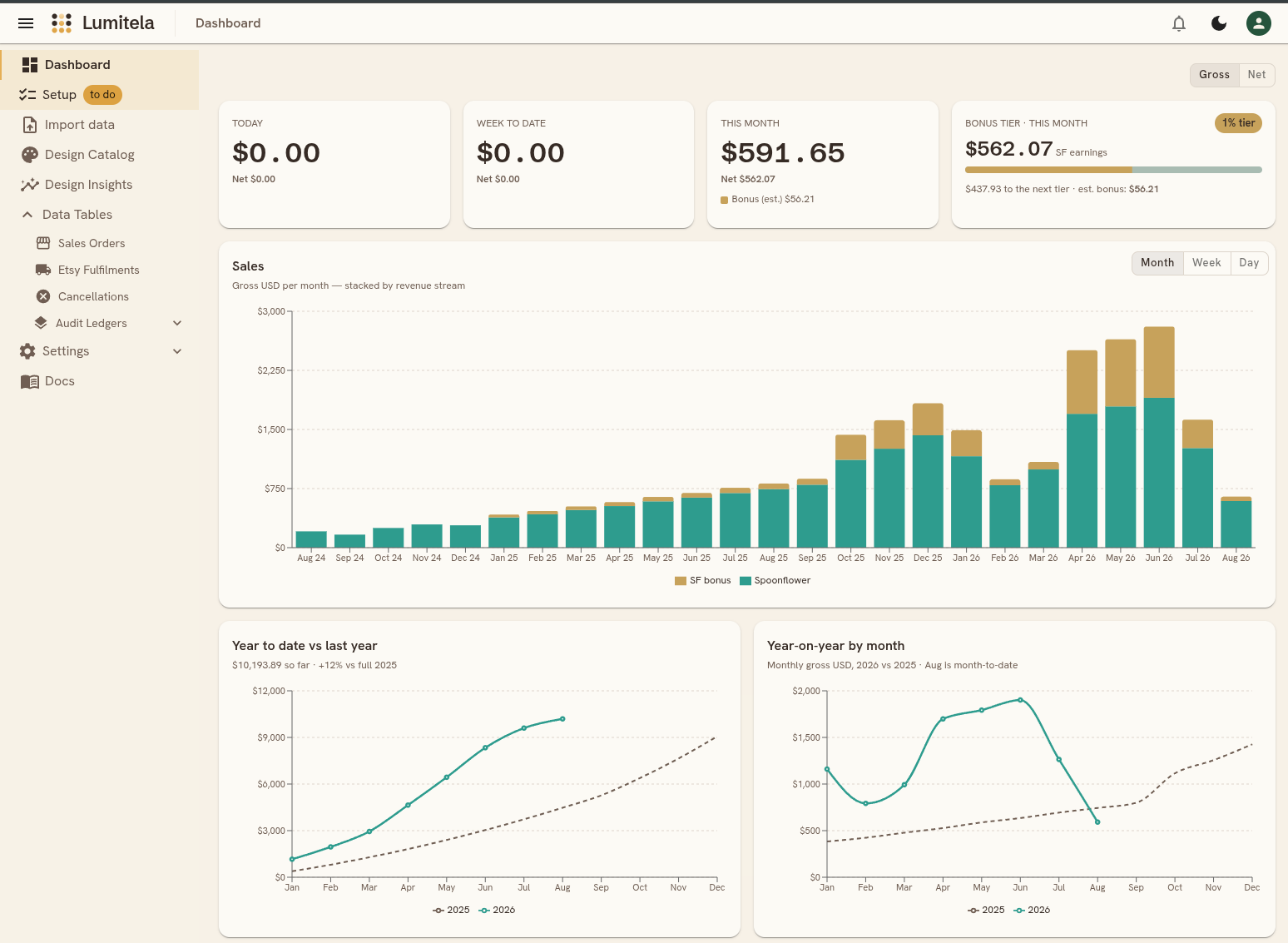
The tracker is not the only place the bonus shows up. The This month tile lists your Spoonflower bonus on its own line, and the monthly Sales chart stacks a third band for the bonus on top of your Spoonflower and Etsy revenue, so you can see how much of a good month the bonus contributed. The bonus band only appears at the Month setting, because the bonus itself is a monthly figure. Everything follows the dashboard's Gross / Net switch. The tour of the whole page is in Dashboard and Spoonflower bonus tier tracker.
Using the tracker to plan a month
A few ways designers use it:
- Decide when to promote. If you are $80 from the 3% tier with a week to go, that is the week to feature a design or send a newsletter, because the bonus applies to everything you sold that month, not just the sales that tipped you over.
- Read the year, not just the month. The stacked chart shows which months earned a bonus band and which did not, so you can see whether you are consistently landing just under a threshold.
- Check the actual against the estimate. Once the statement posts, the card swaps the estimate for Spoonflower's real figure. Every number can be traced back to the statement line it came from in the read-only audit ledgers, so you can check it yourself.
Spoonflower bonus tier questions
Where do the tier thresholds come from?
Lumitela uses the schedule above: no bonus under $300 of monthly net earnings, then 1%, 3% and 5% of retail at $300, $1,000 and $1,500. Actual bonus figures always come from your own Spoonflower statement once it posts.
Why does the card say "est. bonus"?
The current month has no statement line yet, so the bonus is estimated from what you have earned so far. It is replaced by Spoonflower's actual figure as soon as the next statement is imported.
Does a cancellation change my tier?
It can. Tier progress keys off net earnings for the month, so a canceled order lowers the figure and can move you back below a threshold.