Etsy to Spoonflower order matching
What matching is
If you sell on Etsy, your orders are fulfilled through Spoonflower: an Etsy sale comes in, and a separate Spoonflower fulfillment gets printed and shipped to pay for it. Matching is how Lumitela pairs the two up, so an Etsy order and the Spoonflower receipt that fulfilled it are recognized as one transaction instead of two unrelated numbers.
That pairing is what makes true margins possible. Without it, you'd only see what Etsy sold for, or what Spoonflower charged, never both sides of the same sale at once. With them matched, Lumitela can show you gross margin (the Etsy sale minus the Spoonflower cost) and net margin (the same, after Etsy's own fees), right down to the order. For the short version, see what matching means for your Etsy margins.
The statuses
Every Etsy order on the Etsy Fulfillments list carries one status, and the same words are used everywhere in the app:
- Unmatched: no Spoonflower receipt is paired with this order yet. Either the receipt hasn't been imported, or the auto-matcher couldn't find a confident pair.
- Matched: the order has its receipt, automatically or by hand, and its margins are computed.
- Needs review: matched, but something looked off (two near-equal candidate receipts, or a quantity mismatch). Worth a quick look in the workspace.
- Canceled: the order was canceled; it no longer counts as revenue and never claims a receipt.
- Refunded: your Etsy statement shows the order was refunded in full. Its sale amount is zero, it stops waiting for a receipt (a receipt already paired stays, so the cost you paid remains visible), and it drops out of the unmatched warnings.
- Add-on: a custom one-off order (a rush shipping fee, say) that you have folded into the main order it was paid for. Its revenue and fees count there; it never needs a receipt of its own.
Use the Status filter at the top of the list to triage; the notification bell's "unmatched Etsy orders" link lands on the same filter.
How the auto-matcher pairs them
There is no shared order number between an Etsy sale and a Spoonflower receipt, so Lumitela matches on evidence:
- Ship-to fingerprint (strict): same ZIP code, same street number, and at least one shared name token. For orders shipped outside the US, where postcodes and street lines take many shapes, Lumitela recognizes the country's address format and compares the address as a whole instead.
- Time: the receipt must be placed at (or shortly before) the order, up to 45 days after.
- Amount: the receipt can't be implausibly more expensive than the sale.
Among candidates that pass, the best-scoring pair wins; closeness of name, street, city, quantity and time all count. The matcher is deliberately strict: when it isn't sure, it leaves the order Unmatched for you rather than guessing.
The match workspace
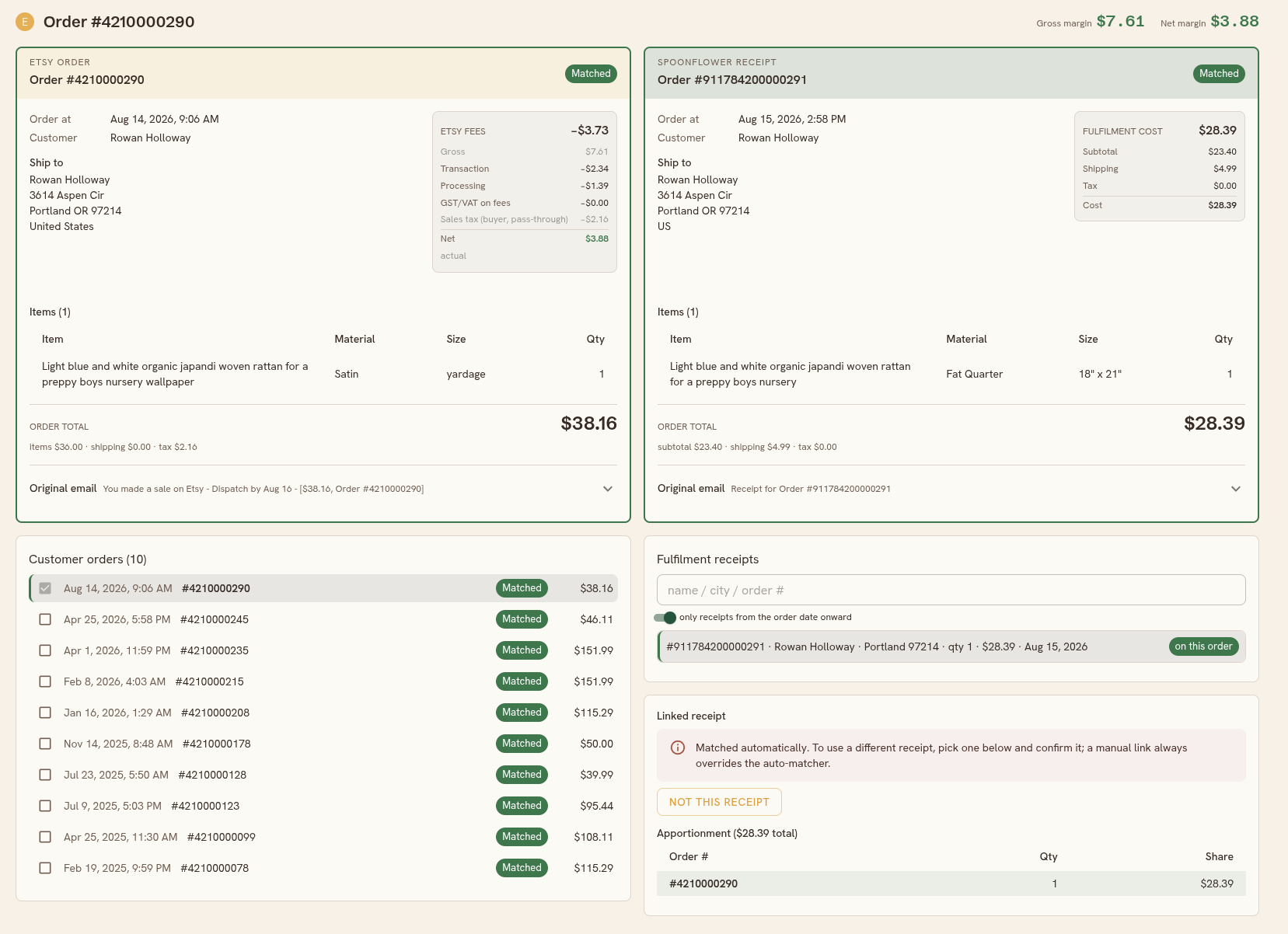
Click any order on the list to open its workspace, with the order's gross and net margin in the top corner. Two cards sit side by side at the top: the Etsy order (what the buyer paid, its items, fees, and the original email) and the Spoonflower receipt currently selected (the fulfillment cost and its original email). When more than one order or receipt is involved, tabs on the cards let you flip between them.
Below the cards:
- Customer orders lists every order from this buyer. When a receipt is selected, each row leads with a checkbox, and the checked set is exactly the set of orders that receipt covers; tick a sibling order to spread one receipt across a batched print run.
- Fulfillment receipts lists the suggestions and your search results (search by name, city or Spoonflower order number, with a switch to only consider receipts from the order date onward). Chips tell you each receipt's standing: suggested, on this order, linked elsewhere, or Self order.
- The linked receipt panel at the bottom is where you act: confirm a link, review the apportionment, or remove it.
Fixing a wrong auto-match
- Wrong receipt? Pick the right one from the list and Confirm link; a manual link always overrides the auto-matcher. If the receipt currently fulfills a different order, the panel warns you before you take it.
- No receipt is right? Click Not this receipt on the auto-matched pair. The order returns to Unmatched, the receipt returns to the pool, and the auto-matcher will never re-propose that exact pairing (you can lift this later with Allow auto-match again).
Splits, seconds and re-sends
- One receipt, several orders (a batched print run): tick each covered order in the Customer orders panel and confirm. The cost is apportioned across them by quantity, with the split previewed before you confirm; you can type exact shares over the preview if the quantities don't tell the whole story.
- One order, several receipts: confirming another receipt on an already-linked order asks whether to replace the existing link or add the receipt as a second one (costs are summed).
- Re-send marks a replacement shipment: its cost counts against your margins with no new revenue expected, and it's reported separately.
Add-on orders
Sometimes a buyer pays extra after the main order, for example a rush shipping fee collected through a custom private listing. That payment arrives as its own Etsy order with nothing to fulfill. Open it in the workspace: Customer orders lists the buyer's other orders, including ones from the same address under a different name. Click Clip on the main order's row (or find it with the search box under the list). The add-on is now paperclipped to that order: its revenue and Etsy fees count there, it leaves the Unmatched list, and it never counts as an extra unit sold. On the main order the clipped note peeks out above the Etsy card; click it to flip between the two. Unclip on the add-on undoes it.
Self orders
Receipts for things you ordered yourself (samples, your own fabric) aren't fulfillments. Mark them as Self order from the Spoonflower fulfillment ledger (under Audit Ledgers in the sidebar) and they're excluded from matching and from your costs. Names on your profile's excluded list are handled automatically.
Where the margin numbers come from
- Gross margin = Etsy revenue (what the buyer paid, excluding the sales tax Etsy collects and remits) minus the Spoonflower fulfillment cost (cash plus any Spoondollars spent).
- Net margin = gross margin minus Etsy's fees. Fees come from your imported Etsy statement when available (shown as actual); until then they're estimated from Etsy's published fee schedule (shown as est.).
The calculations page covers the wider money model.