The extension that keeps Spoonflower, Etsy and Lumitela in sync
The Lumitela extension is the bridge between your shops and your numbers. It connects Spoonflower and Etsy to Lumitela from inside your own browser: one guided import brings in your Design Library and your whole sales history, and from then on it keeps designs, statements and fees in step on a schedule, so what you see in Lumitela is always what is true in your shops.
What the extension does
The Lumitela extension is a Chrome side panel that reads your own shop pages, in your own browser, while you're logged in, the same way you read them yourself. It never asks for your Spoonflower or Etsy passwords, and it only ever sends data to your own Lumitela account. Its three working tabs:
- Designs syncs your Design Library: new designs only (the recommended everyday sync), a full re-sync that re-aligns titles, descriptions, tags, collections and thumbnails with Spoonflower, or a fast tags-and-collections refresh.
- Spoonflower pulls your payment statement CSVs, year by year.
- Etsy pulls your Etsy statement CSVs, month by month, once your Etsy shop is set up in Lumitela.
The first time you open it, a Get started tab sits in front of these and offers a guided first import that runs all three in one go.
Install it
The extension is a normal one-click install from the Chrome Web Store:
- Open the Lumitela listing on the Chrome Web Store and click Add to Chrome.
- Click the puzzle-piece icon in the toolbar and pin Lumitela so its button stays visible.
- Click the Lumitela button to open the side panel.
Your first import
- Log in to lumitela.com and spoonflower.com (and etsy.com, if you sell there) in ordinary browser tabs, same as always. The strip at the top of the side panel shows what the extension can see, and its lights turn green as each sign-in is spotted.
- The Get started tab offers your initial import: your design catalog (titles, descriptions, tags and thumbnails), your Spoonflower sales history, and your Etsy orders and fees, all from one button. Press Start import.
- The panel shows progress as it works through your Design Library and statements, and finishes with a summary of what it captured. A big library takes a while (around 15 minutes for a few thousand designs), so let it run its course. From then on, the Designs, Spoonflower and Etsy tabs keep things current.
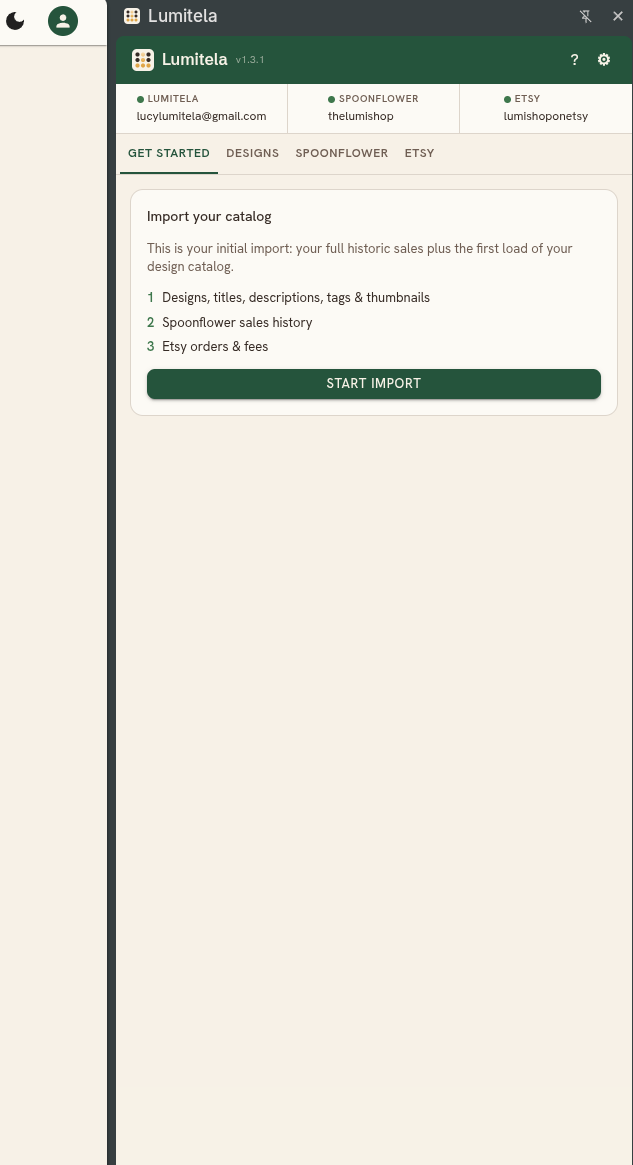
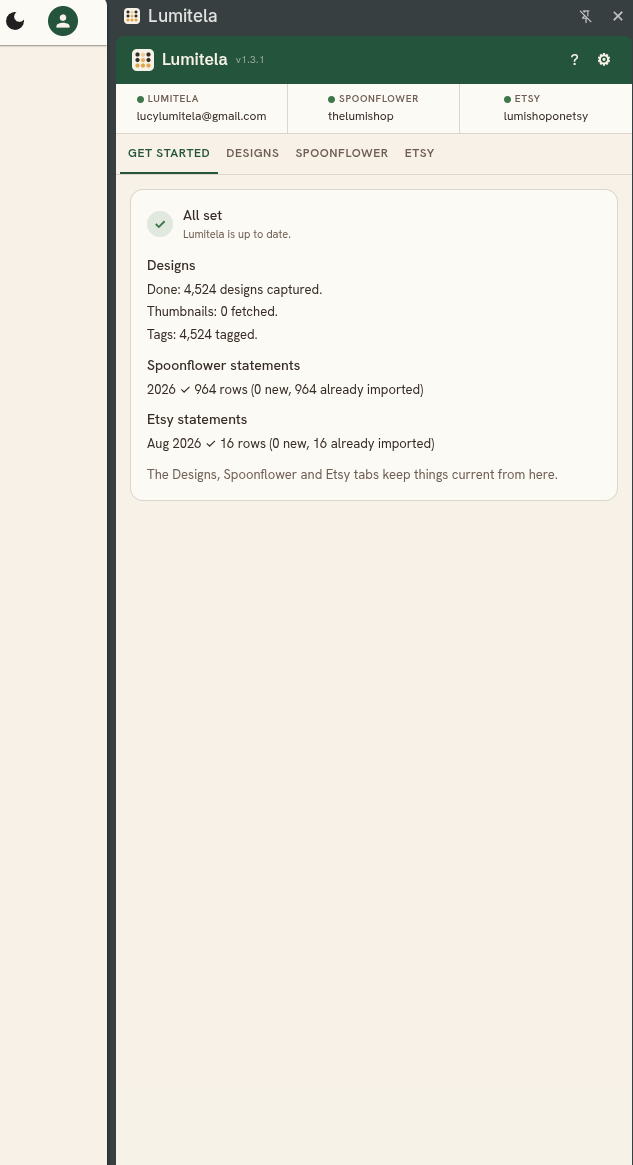
The Etsy tab shows "not set up" until your Etsy shop is added in Lumitela (the setup wizard asks, or turn it on later in Settings). The first time the extension reads etsy.com, Chrome asks once for permission to access the site. That's Chrome's own one-time prompt for a new site the extension touches, not a Lumitela account permission, and it doesn't ask again after.
Automatic sync
You don't have to press the buttons yourself forever. Open the extension's settings (the gear icon) and turn on Automatic sync: daily, weekly, or monthly, at a time you choose. It runs while Chrome is open and you're logged in to your shops, so pick a time you're usually at your computer. Monthly defaults to the 2nd of the month, because Spoonflower statements can lag a day. If a scheduled run misses (computer off, or not logged in), no harm done: it runs the next time everything lines up, or you can press Sync yourself.
Keeping statements synced matters more than it might seem: cancellations and credits only ever appear on statements, and when a "guest user" buyer later creates a Spoonflower account, the statement is where their real username gets filled in.
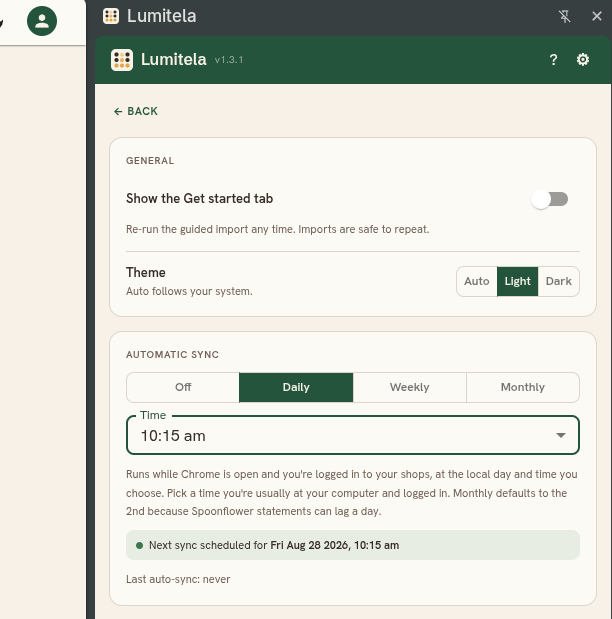
The same settings page has a toggle to bring the Get started tab back if you ever want to re-run the guided import. Imports are always safe to repeat: anything Lumitela already has comes back as "already imported" instead of being counted twice.
Requirements
The extension needs Chrome or a Chromium-based browser (Edge and Brave both work the same way), version 116 or newer. If you're on a different browser, you're not blocked: everything the extension does has a manual equivalent using file imports instead. See Import your Spoonflower sales history for statements and order emails, and Import your Spoonflower Design Library for your designs and thumbnails.